Vibe Watch
A wrist-mounted M5Stack watch that keeps six AI coding agents in view at once, and speaks the protocol of the official hardware so the existing host software will drive it.
What it is
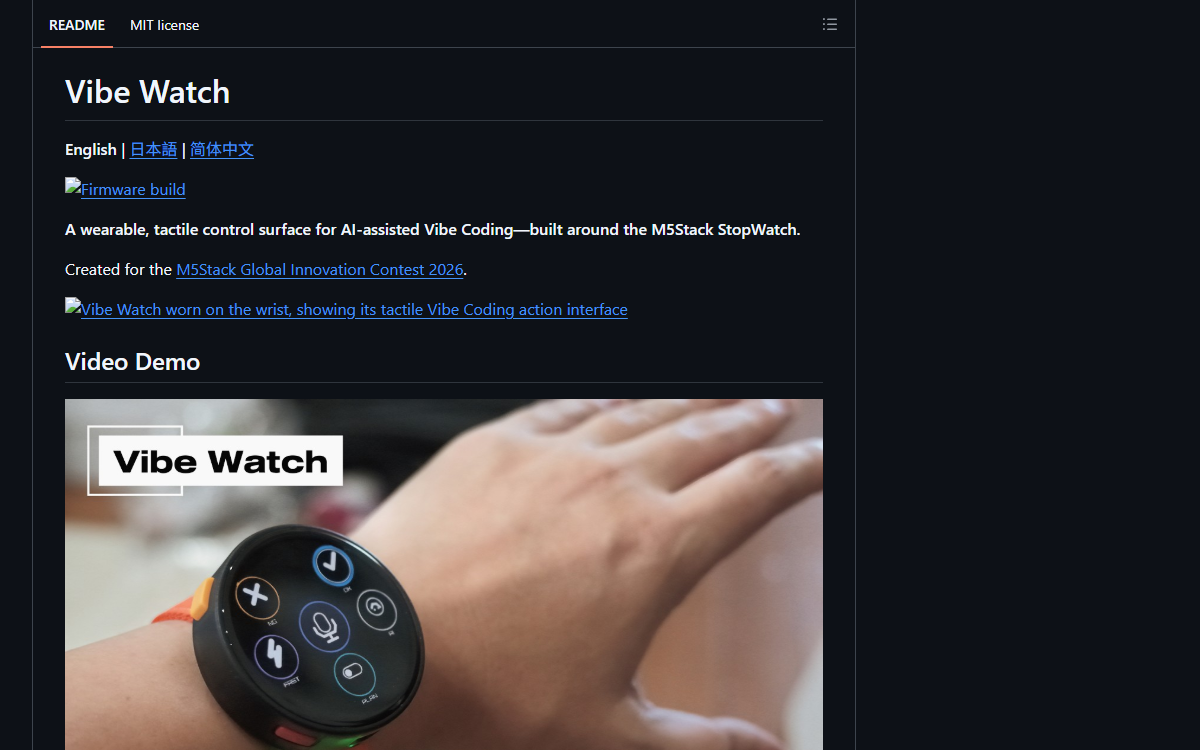
A wearable controller for AI-assisted coding, built on an M5Stack StopWatch: a round 466-pixel touchscreen, two physical buttons, a speaker, a vibration motor and an ESP32-S3, strapped to the wrist with a modified watch kit. It shows six running agents as a spatial arrangement rather than a list, turns approve and reject into two physical buttons with different sounds, and puts push-to-talk where a hand already is. The interesting part is underneath: the device implements the vendor-defined Bluetooth HID protocol of OpenAI’s own Codex Micro, so the host software that already exists recognises it as that device.
Who built itA Japanese developer and VR evangelist who worked at Oculus VR and left it to build Mikulus, a VR operating system. His GitHub bio is four words long — “Human Engineer. Not AI.” — which is a pointed thing to put on the profile of a man who has just spent his weekend building hardware for AI agents to talk to.
Build log
7 stages- 01
He bought the official one first
The project begins with a purchase and a question. The author writes that after buying an OpenAI Codex Micro — a physical device for AI-assisted coding, documented on OpenAI’s own site — he was taken with the idea of dedicated hardware for this work, and wanted to find out whether the same interaction could be made smaller, more glanceable and more expressive. The M5Stack StopWatch already contained most of what that needs: a round touchscreen, physical buttons, a speaker, a vibration motor, Bluetooth and a battery, in a case small enough to wear. So this is not a clone of a product for its own sake. It is one person asking what the interaction is actually made of, and answering with hardware he could buy and modify.
- 02
Two layers, and a screen that is round on purpose
The interface is two layers on one circular display, switched by pressing both hardware buttons together. The first places six live agent indicators around the edge, each showing its state in colour, brightness and motion; tapping one, or stepping with a button, moves a selection ring with a spring animation that overshoots and settles, which the submission notes is what makes the navigation readable without looking. The second layer replaces that with actions — fast, no-good, OK, plan, assistant — and draws coloured rails from the two physical buttons to their on-screen counterparts so the mapping is visible rather than learned: the left orange button rejects, the right blue one approves. The author is explicit that the screen is not decoration. Sound, motion and haptics all describe the same state as the display, and the two decision buttons have deliberately distinct square-wave sounds, one rising and one falling, so the outcome is audible while looking at something else. Plan mode is a visible toggle with its own state, and the centre of the display stays available for push-to-talk.
- 03
The part that is actually hard
Under the interface is a Bluetooth HID implementation, and it is the reason this project is more than a shell around a touchscreen. The device presents a composite HID report map offering keyboard, consumer control and relative pointer — an ordinary input device to any host — and then a fourth, vendor-defined report that carries a JSON-RPC channel in both directions. That fourth channel is not something the author invented: the header file names the vendor identifier, the product identifier, the report number and the exact frame layout, and describes itself as the version the reference firmware uses. The frame is compact: the first byte is a channel number, the second is the length of the chunk that follows, and a 63-byte report is reassembled into a two-kilobyte buffer before parsing. Request fields carry short aliases as well as long ones, so a method can arrive as
methodorm, an identifier asidori. Reading the header is enough to understand the project’s real claim: it is not that he built a nice wrist interface, it is that anything already written to talk to this device will talk to his. - 04
What the host pushes down the wire
The JSON-RPC methods are where the design shows through, because the host does most of the talking. Three arrive downward. One is namespaced for the vendor and carries thread status, which the watch renders as the six agent indicators — so the state of each agent is decided on the computer and displayed on the wrist, rather than the watch guessing at it. A second, also vendor-namespaced, carries an RGB configuration which the watch applies to what the firmware calls its ambient status, a compatibility path that accepts what the reference hardware needs even though this device has no addressable LEDs to drive. The third is the host reporting which application is currently focused, which the watch displays after truncating long names to eighteen characters and an ellipsis. Only two methods travel the other way, one asking for device status and one for the firmware version, and the status reply carries battery level, charging state, firmware version and which interface layer is showing. The watch is told what is happening and asks very little.
- 05
Converting a watch kit with a pair of cutters
The wrist mount is not a 3D print or a product. M5Stack sells a watch accessory kit for its rectangular M5Stick range, and its plastic mount cannot hold the round StopWatch as shipped, so the README documents cutting it down: remove the mount from the strap, use flush cutters to take off the raised retaining hooks a little at a time, trim the burrs until the surface is flat, clean and dry both faces, cut double-sided tape to fit inside the footprint while keeping buttons and openings clear, centre it on the back of the StopWatch, press it down, refit the strap and pull-test it before wearing. Four photographs cover the steps. It is a small thing and the honest kind of small thing: the accessory exists, it is the wrong shape, and the instructions for making it the right shape are four numbered steps and a warning to wear eye protection.
- 06
Built twice in one day
All thirty-three commits land on 8 August 2026, between one fifty-one in the morning and a quarter past six, so the whole thing was written and released in about four and a half hours. One author, no co-author trailers, no issues and no pull requests ever opened. One release, tagged the same day and described as the first contest-ready version, with a prebuilt firmware binary alongside the source. Twenty-three files, most of the weight in eight photographs of the device and the mount conversion, and two source files — one of which, the main program, is sixty-eight kilobytes on its own. It is built with PlatformIO against the Espressif Arduino platform on a sixteen-megabyte partition table, with the M5Stack unified library pinned to a specific commit and NimBLE and ArduinoJson underneath it, and a GitHub Actions workflow that compiles the firmware on every push.
- 07
Documentation as part of the entry
The repository is written for a competition — the M5Stack Global Innovation Contest, with a separate submission kit prepared for Hackster — and the documentation is correspondingly complete. The README exists in English, Japanese and Chinese. There is a release-notes file, a script for the promotional video, and a submission document containing an elevator pitch, a project story, a hardware table, the wrist-mount steps and a section on what makes the design different. That last section is where the author states his position most clearly: this is not a macro pad with a decorative screen, the controller participates in the interaction, and the goal is a tiny AI cockpit whose interface, sound, motion and haptics all communicate the same state. The README also carries a link to the official Codex Micro documentation in its references, which is a graceful way to handle having built something compatible with a product you admire.
Adjacent records
All records →No. 053
Vibe Coding Keyboard
A meme about vibe coding turned into working hardware: an ESP32-S3 desk keyboard with nine keys, a rotary encoder and a small screen holding ten switchable keymaps.
No. 043
N.O.R.A.Core
A single-author AI companion with two brains, an encrypted diary of its own, and 98 commits signed in its own name.
No. 062
Tiny Engineer
A 3D-printed desk robot that reads, thinks and types while your AI coding agent works — driven by a REST endpoint that any tool able to make an HTTP request can call.