CCManager
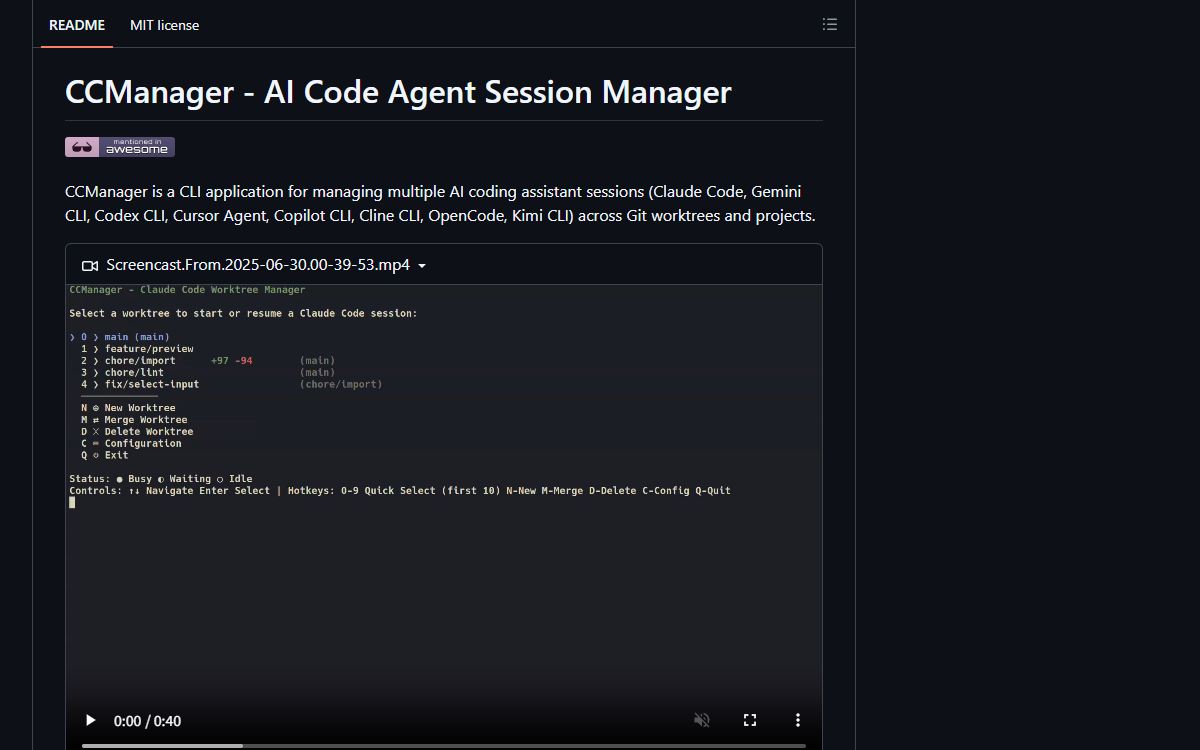
A terminal menu that keeps several coding agents running at once, one per git worktree: it shows which are busy, which are waiting on you and which are idle, creates and merges the worktrees, and can bring the whole set back after a crash.
What it is
A session manager for coding agents, built around git worktrees. It runs in a terminal, lists every worktree in a repository with the agent attached to it, and shows whether that session is busy, waiting for input or idle, so several agents can work in parallel without a second terminal window. Worktrees are created, merged and deleted from inside it, gitignored files a project needs can be carried into new ones, and the sessions that were open when it last exited or crashed can be launched again on the next run. Eight assistants are supported — Claude Code, Gemini CLI, Codex CLI, Cursor Agent, Copilot CLI, Cline CLI, OpenCode and Kimi CLI — each with its own configurable state-detection rules.
Who built itA Japanese software engineer, in his own words, with an account opened in 2019, 68 public repositories and 94 followers. He wrote 566 of the repository’s 770 commits; a workflow bot accounts for 145 more, and about twenty other people have contributed, several of them regularly.
How it is put together
The parts · 6A terminal interface over a session orchestrator, with a git worktree as the unit of work. One process per session is spawned and supervised, the menu is a rendering of the current state of all of them, and the state itself is inferred per assistant by configurable rules rather than assumed to be uniform. Two consequences shape the code: because creating a worktree can take minutes in a large repository, it is treated as a long-running operation that must not block input; and because the sessions outlive the interface, the record of what is running is written continuously rather than at exit, so the tool can offer to bring the same set back after it dies. The worktrees are managed from inside the program rather than by hand, which is why so much of the surface area is git plumbing — worktree creation, merging, include files, and detached-head states — and why the interface has to make the state of a dozen sessions legible in a list.
- src/
- Sixty-two service files doing the work — session orchestration, worktree operations, state detection, configuration, hooks and the optional approval checker — under a component layer of 45 files, one of which is a 42 KB application shell, with 35 utilities, six hooks, the type and constant directories, and two end-to-end tests.
- .kiro/specs/ and .kiro/steering/
- The specification workflow: two features, each with a requirements and a design document, plus three steering documents describing the product, the code structure and the technology choices. It is a directory format belonging to one tool, filled in and driven from another.
- .claude/commands/kiro/
- Ten command files that drive that workflow, from specification initialisation through requirements, design, task breakdown and implementation to status, validation of the design and a gap check, plus the two steering commands — a 20 KB design command being the largest.
- docs/ and AGENTS.md
- Thirteen documents, led by an 11 KB migration plan for error handling and a worktree-hooks reference, and covering auto-approval with its own JSON schema, devcontainer use, multi-project mode, project and command configuration, status hooks, and the include-file and worktree-directory conventions.
AGENTS.mdis nine bytes: a link to something else rather than a document. - npm/ and plugins/
- Five platform directories — Apple silicon and Intel macOS, x64 and arm64 Linux, and Windows — so the package installs a matching prebuilt binary rather than requiring a toolchain, which is why the publish workflow is 2.9 KB and the continuous integration file 801 bytes.
- Configuration surface
- Keyboard shortcuts, command presets with fallback, per-assistant state-detection strategies, status-change hooks that fire when a session changes state, a devcontainer setup, and an approval configuration with a schema — all of it file-driven, which is what lets eight assistants with different habits share one menu.
Choices, and what they beat
Worktrees rather than several sessions in one checkout over running the assistants side by side in the same working tree
Parallel agents editing one checkout collide, so each session gets its own worktree — and the program takes responsibility for creating, merging and deleting them rather than leaving that to the user. Most of the plumbing in the repository is a consequence of that choice.
Restoring a session re-runs its command and nothing more over also restoring the previous terminal output and conversation
Stated with the rejected alternative in full: reproducing the transcript would mean owning a format for every assistant, and each assistant already has its own way of resuming. What the restore does is launch the same command in the same worktree, and the record of the sessions is written as they come and go so that a crash cannot lose it.
Adopt the
.worktreeincludeconvention over a project-specific include fileA gitignore-syntax file at the repository root is already read by Claude Code, Codex, Conductor and a standalone tool, so using the same name and semantics means a file the user already maintains works unchanged instead of a second configuration describing the same thing.
Approve prompts by checking them rather than by turning confirmations off over an auto-yes mode that answers everything
The README’s comparison with a similar tool says the other one “bypasses Claude Code’s built-in security confirmations — not recommended for safe operation”. This project’s equivalent is experimental and routes the decision through an AI check against a documented, schema-backed configuration — and it added a confirmation step, focused on cancel, before exiting can terminate every running session.
A layout budget rather than one fixed menu over always aligning the columns
The aligned layout is chosen per list: the caller passes the number of columns a row label may occupy, and when the aligned version does not fit the tag goes back to being appended to the name. It keeps the improvement without taking the menu away from a narrow terminal.
Read from.kiro/specs/loading-spinner-async-operations/design.md, .kiro/specs/result-pattern-error-handling-2/design.md, .kiro/steering/*, README.md (19,070 characters), docs/auto-approval.md, the pull request bodies, and the complete 232-file tree with sizes.
Build log
7 stages- 01
A menu for eight assistants, and a year of steady releases
The repository was created on 2025-06-07 and has 770 commits, with an unusually even shape for a solo project: 205 in the first month while it was being built, and then between six and eighty-one every month since, including the months in 2026 when most of this archive’s subjects were in their first rush. It has produced 163 releases, from an early
0.0.4in June 2025 tov4.4.4in September 2026 — a version line that was restarted at some point, which the numbering still shows. Around that sit 1,256 stars, 93 forks, 276 pull requests and 58 issues, and roughly twenty contributors beyond the author, one of whom has landed seventeen changes. Of the 306 co-author trailers, the largest single group is the 187 that say only “Claude”, followed by Opus 4.5 on 44. - 02
The unit of work is a worktree, and creating one is the hard part
The problem this tool exists to solve is that two agents editing one checkout collide, so each session gets its own git worktree — and the fallout from that choice shows up in the pull requests. One of them (number 337) is about creating a worktree: the operation held the user on a loading screen until every step finished, and the slow steps ran synchronously, so the interface could not respond at all while they ran. Branch-name generation,
git worktree add, copying session data and include files, and the pre- and post-creation hooks now run asynchronously; pressing Enter on the loading screen returns to the menu while the creation continues, and the menu lists the running creations with elapsed time. The author’s own note on the change is worth more than the feature: the automated checks had been run, but he had not yet exercised the flow by hand in a terminal. A smaller one (332) is about reading the menu: the state tag was appended to the branch name, so it started at a different column on every row and scanning for a blocked session meant reading each row to wherever the name happened to end. It now has its own column, and because narrow terminals cannot afford the width, the caller hands the layout a column budget and the old arrangement is used when the aligned one does not fit. - 03
The bug that only happens with Num Lock on
The best fix in the repository is one nobody could have reported clearly. A user found that
Ctrl+E— the shortcut back to the menu — silently did nothing inside an attached session, and only on some machines. The cause is in how extended keyboard protocols report a keypress: the modifiers arrive as a single number that also carries the keyboard’s lock state, adding 64 for Caps Lock and 128 for Num Lock on top of whichever modifiers are actually held. The shortcut matcher compared incoming bytes against strings whose modifier field was hardcoded to the value for control, so aCtrl+Earriving with the lock bits set matched nothing and fell through to being written straight to the child process — no error, no feedback, and nothing in the interface to explain it. The reason it looked like a machine-specific fault is that laptops commonly power on with Num Lock enabled internally even when they have no numeric keypad. The fix ignores the lock bits when matching, which is the kind of correction that only comes from reading a specification rather than guessing at the symptom. - 04
What restore deliberately does not restore
Quitting the tool kills the assistant processes it started, so the next launch used to open on an empty menu. The fix keeps a record of the open sessions in a configuration file — written as sessions come and go rather than on exit, so a crash, a forced kill or a closed terminal leaves it intact — and offers to launch them again on startup. The interesting part is the boundary the author drew and wrote down: restoring means running each session’s launch command in its worktree again, and the previous terminal output and the conversation inside the assistant are deliberately not brought back. Reproducing those was considered and dropped, because it would mean owning a transcript format for every assistant, and each one already has its own way of resuming. The distinction is sharper for being inconsistent on purpose: a separate feature does copy Claude Code’s session data between worktrees so that conversation context follows, and that is offered as an explicit action rather than part of the automatic path.
- 05
Adopting a convention instead of inventing one
A new git worktree contains only tracked files, so the things a project needs in order to actually run — a local environment file, a certificate, a fixture — do not come with it. The obvious answer is a configuration key of one’s own, and the author took the other route: support the file name that worktree-aware tools have already converged on.
.worktreeinclude, a gitignore-syntax file at the repository root, is read by Claude Code, Codex, Conductor and a standalone command-line tool, so implementing the same name and the same semantics means a file a user already maintains for those tools works here unchanged, instead of requiring a second configuration that describes the same thing. The pull request names the alternatives it could have joined and explains the benefit in terms of the user’s existing setup rather than the project’s convenience. - 06
Two ways to stop a session from asking, and why this one is different
The README argues its case against another tool for the same job by telling tmux users to stay where they are, then naming three differences. One of them is a safety argument: the other tool’s auto-yes feature “bypasses Claude Code’s built-in security confirmations — not recommended for safe operation.” This project ships the same capability by a different route, and marks it experimental: Auto Approval approves prompts using AI verification, with its own configuration document and a schema file, and the state-detection rules that decide what “waiting” means are configurable per assistant because each CLI announces itself differently. The same instinct shows up in the smaller decisions — adding a confirmation step before exit, with the focus defaulting to cancel and the dialog saying how many sessions would be terminated, because the shortcut that exits had been a single keypress away from killing every running session.
- 07
Specifications written in one tool and driven from another
Two features carry a full specification directory: a requirements document and a design document each, one pair at 34 KB and 52 KB. Alongside them sit three steering documents covering the product, the structure and the technology choices. What makes this worth recording is where the workflow is driven from: ten slash commands under
.claude/commands/— initialise, requirements, design, tasks, implement, status, plus two validators and two steering commands — that run that specification process from a different agent tool than the one whose directory format it is. The rest of the repository-level agent material is modest by the standards of this archive: thirteen documents underdocs/including a migration plan for error handling and the auto-approval configuration, a plugin directory for the assistant’s own plugin system, and anAGENTS.mdthat is nine bytes — a link, not a file.
Adjacent records
All records →No. 046
ORCH
A runtime for running several coding agents on one project at once: you define a team, give it a goal, and a CTO agent decomposes the work while the rest pick up tasks — across Claude, Codex, Cursor, Grok and a plain shell — with all the state kept in files rather than a database.
No. 039
Vibe Projects
One person’s monorepo of six AI-generated projects — an Android agent harness, a per-hunk diff reviewer for VS Code, and four small Android apps — kept deliberately as a running measure of what the models could build.
No. 061
DeepSeek Harness
DeepSeek’s agent harness, built so that the model adapter, the tool registry, the session log and the agent loop itself are plugins — swapped from a configuration file rather than a fork.