
vphone-cli
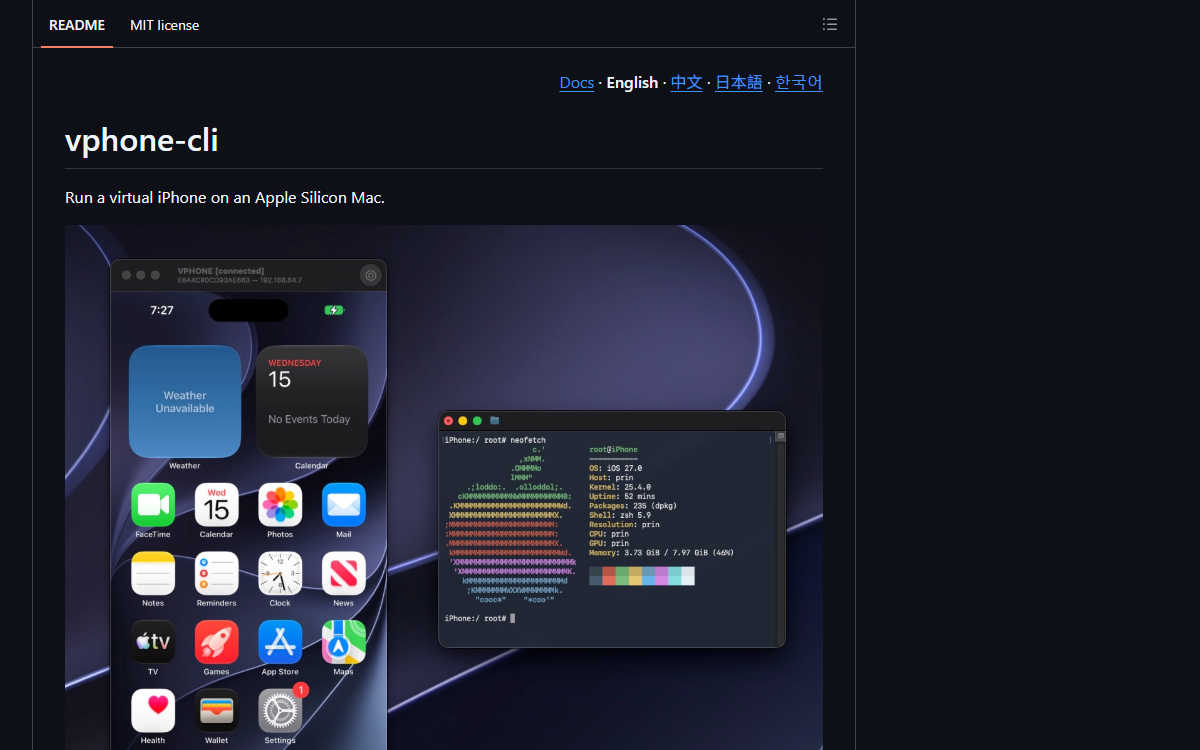
Runs iOS inside Apple’s Virtualization.framework on a physical Apple Silicon Mac, with a graphical window, pre-patched firmware, VM cloning and an optional local HTTP and WebSocket automation API.
GitHub avatar of Lakr233, not the project’s own logo — taken from github.com on 2026-10-02.
What it is
vphone-cli boots iOS on a physical Apple Silicon Mac using Apple’s Virtualization.framework and the PCC research virtual machines, for security research, reverse engineering and debugging. It gives the virtual device a real window — browse apps and files, take screenshots and recordings — ships pre-patched firmware with an installable package environment, can export, import and clone a VM, and exposes an optional local HTTP and WebSocket interface for automation. No Xcode, Python or Homebrew is needed at runtime.
Who built itThe repository’s 743 commits come from a long tail led by the maintainer — Lakr on 434 and Lakr233 on 41 — then zqxwce on 125, Maximilian Paß on 23, TastyHeadphones on 16 and xiahouzhen on 9, with roughly thirty more contributors below that. The documentation ships in English, Chinese, Japanese and Korean.
How it is put together
The parts · 4The project is a thin command surface over Apple’s own virtualisation stack, with the unusual parts being what it takes to make a research guest boot and stay useful. Everything difficult is below the interface: firmware that has to be restored with online signing tickets, a VM that has to be creatable, clonable and resumable, and a host that has to be explicitly told to allow research guests. Above that sits one CLI, one launchpad window, and an optional local API for driving the device from another program.
- VPhoneExecutable/VPhoneCommand
- The command surface — 325 files and 3.98 MB, the largest part of the repository — covering VM lifecycle, firmware and the operations the README lists.
- VPhoneVirtualization
- 112 files and 1.51 MB of virtualisation code: the layer that runs the guest through Apple’s Virtualization.framework and the PCC research virtual machines, and the boundary where the host requirements come from.
- VPhoneLaunchpad
- 51 files: the graphical window, distributed as a notarised archive, which is how a reader uses the virtual device without the command line.
- The automation API
- An optional local HTTP and WebSocket interface, so the virtual iPhone can be driven by another program rather than by hand — the part that makes it usable as a research fixture.
Choices, and what they beat
Require a physical Apple Silicon Mac and refuse to run in a macOS VM over supporting nested virtualisation
The requirements section states it as a hard limit rather than a caveat, which is what lets the rest of the tool assume Apple’s own virtualisation path.
Ask the host to relax debugging restrictions while leaving SIP on over asking for full protection to be disabled
The README specifies
csrutil enable --without debugplusallow-research-guests enableand then says what that means — SIP stays enabled and only the debugging restrictions are relaxed.Ship an HTTP and WebSocket API instead of only a CLI and a window over a manual-only tool
Listed as an optional automation interface, which is what a security-research or reverse-engineering workflow needs to be reproducible.
Read fromREADME, Documents/ and the repository tree of Lakr233/vphone-cli, read 2026-10-02.
Build log
4 stages- 01
Seven months, 743 commits, and 330 co-author trailers
The repository was created on 2026-02-26 and is still being pushed to. 743 commits have landed across every month since, with two peaks — March (207) and September (353). 330 commits carry a co-author trailer and all but about a dozen name a Claude model: Opus 5.5 on 109, Opus 5 on 64, Opus 4.8 on 39, Fable 5 on 35, Opus 5 (1M context) on 24, Opus 5.5 (1M context) on 13, Opus 4.7 on 8, Opus 4.6 (1M context) on 5, Opus 4.8 (1M context) on 4, Sonnet 5.5 on 4, Opus 4.6 on 3, Sonnet 4.6 on 2 and Claude Code once. The human trailers name ten people, most of them contributors rather than the maintainer.
- 02
The hard part is the host, and the README says so first
The requirements section is where the honest constraints live: a physical Apple Silicon Mac running macOS 15 or newer, and it does not work inside a macOS virtual machine; a 64 GB virtual disk per VM with firmware on top; a network connection, because restoring the system fetches signing tickets online. Two host settings have to be changed before anything runs — booting into Recovery to run
csrutil enable --without debugandcsrutil allow-research-guests enable— and the README states plainly what that does and does not do: SIP stays enabled, with only the debugging restrictions relaxed. - 03
Five things the virtual device can do
The feature list is short and each item is a capability rather than a claim: a graphical window showing the virtual iPhone’s screen, with screenshots and screen recordings; custom firmware that arrives pre-patched and accepts a package environment; backup and cloning, so a VM can be exported, imported and duplicated; an optional local HTTP and WebSocket interface for automation; and no extra dependencies, which the README phrases as what is not needed at runtime — no Xcode, no Python, no Homebrew. Distribution is a notarised launchpad archive from the releases page, and the README notes that not every release is notarised and how to find one that is.
- 04
Where the code actually is
The repository holds 845 files, and they are concentrated rather than spread:
VPhoneExecutable/VPhoneCommandaccounts for 325 files and 3.98 MB,VPhoneVirtualizationfor 112 files and 1.51 MB, andVPhoneLaunchpadfor 51 files. That split matches the three things the project has to do — a command-line surface, the virtualisation layer that talks to Apple’s frameworks, and the launchpad application that wraps them — and it is the shape a reader should expect from a tool whose difficulty is in the platform, not in the interface.
Adjacent records
All records →No. 142
Jeff
A 0.8B open System 1 model with swappable LoRA adapters that makes the quick decisions in front of a large local model, answering first and passing the query on only when it is unsure.
No. 141
Kev
A family of small decision models built on Qwen3.5/3.8 that answer narrow questions with calibrated probabilities, trained and run on hardware you own — and 134 of its 333 commits carry Devin’s name.
No. 140
typesafe-computer-use
It drives a Mac toward a goal typed in plain English: OCR and the accessibility tree read the screen, a TypeSafe classifier picks the next action, and a writing model runs only for free text. A decision costs about $0.0002, a fiftieth of a cent, against $0.032 for a frontier model reading the same screenshot.